A research group
Projects, people and news, written by the whole group.
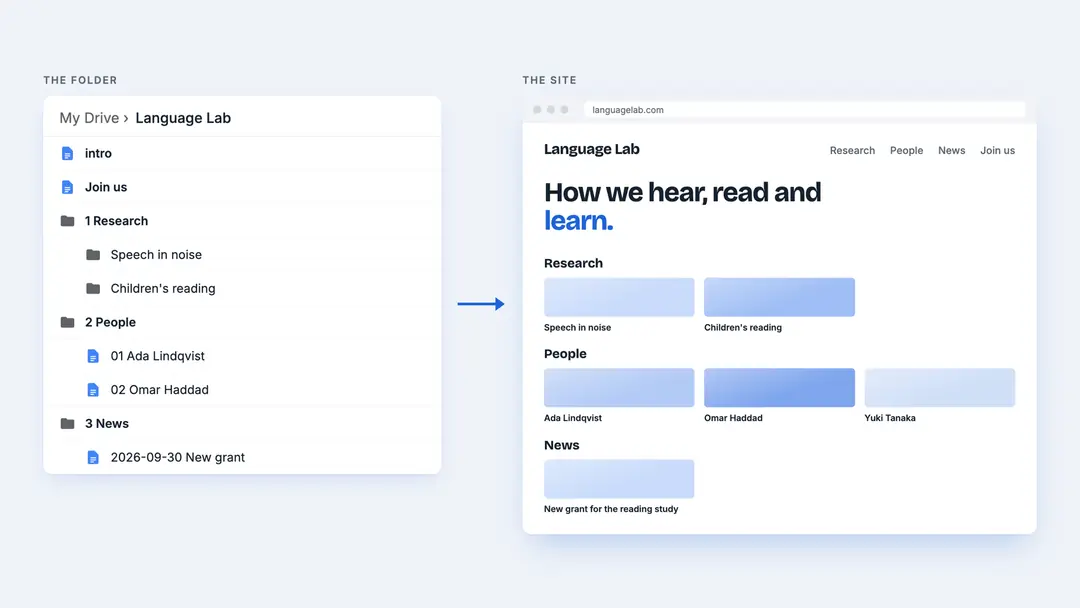
A research group already shares a drive: proposals, papers, notes from meetings. Its website is often harder to update, because it lives elsewhere, behind someone else's login. With Foldocs, the website is one more shared folder.
The folder
- 📁 Language Lab
- 📄 intro
- 📄 Join us
- 🖼️ The group.jpg
- 📁 1 Research
- 📁 Speech in noise
- 📄 01 The question
- 📄 02 Methods
- 🖼️ Setup.jpg
- 📁 Children's reading
- 📄 01 Overview
- 📁 Speech in noise
- 📁 2 People
- 📄 01 Ada Lindqvist
- 📄 02 Omar Haddad
- 📄 03 Yuki Tanaka
- 📁 3 News
- 📄 2026-09-30 New grant for the reading study
- 📁 papers
- 📁 talks
On the site
Three rows on the home page: Research, with a subsection per project; People, in the order of their numbers, each with their photo on their card; and News, newest first, filterable by papers and talks. Join us sits next to the folders, so it is a page in the menu, after the sections. See Folders become sections.
Working together
Drive decides who may write: give the group edit rights, and everyone keeps their own page up to date, with comments and suggestions as usual. The public only gets the link to view, which is all Foldocs needs. No one needs an account on the website itself.
Good to know
- An
introin each project's folder opens its page: one line under its name, then what it's about - Papers as Docs get their own pages; a PDF in the folder is left out, so link to it instead
- Search engines see who the site is by and when each post was published: see Search and sharing